Understand Widevine DRM security levels (L1, L2, L3) and device compatibility for HD content.
Widevine DRM enforces different content-quality tiers based on the security capabilities of the playback device. Understanding the L1, L2, and L3 levels — and their reliance on a Trusted Execution Environment — helps you set realistic expectations for which devices can stream HD or higher content.
The Trusted Execution Environment (TEE) is an essential component within a primary processor, designed to safeguard code and data against unauthorized access and ensure their confidentiality and integrity. In the realm of Digital Rights Management (DRM), TEE plays a pivotal role in enhancing security measures, particularly in the protection of decryption keys and the prevention of video content leaks.
Google’s Widevine DRM technology offers three distinct security levels — L1, L2, and L3 — each designed to cater to different requirements of content protection. These levels are critical in determining the quality of content that can be securely streamed and accessed on various devices.
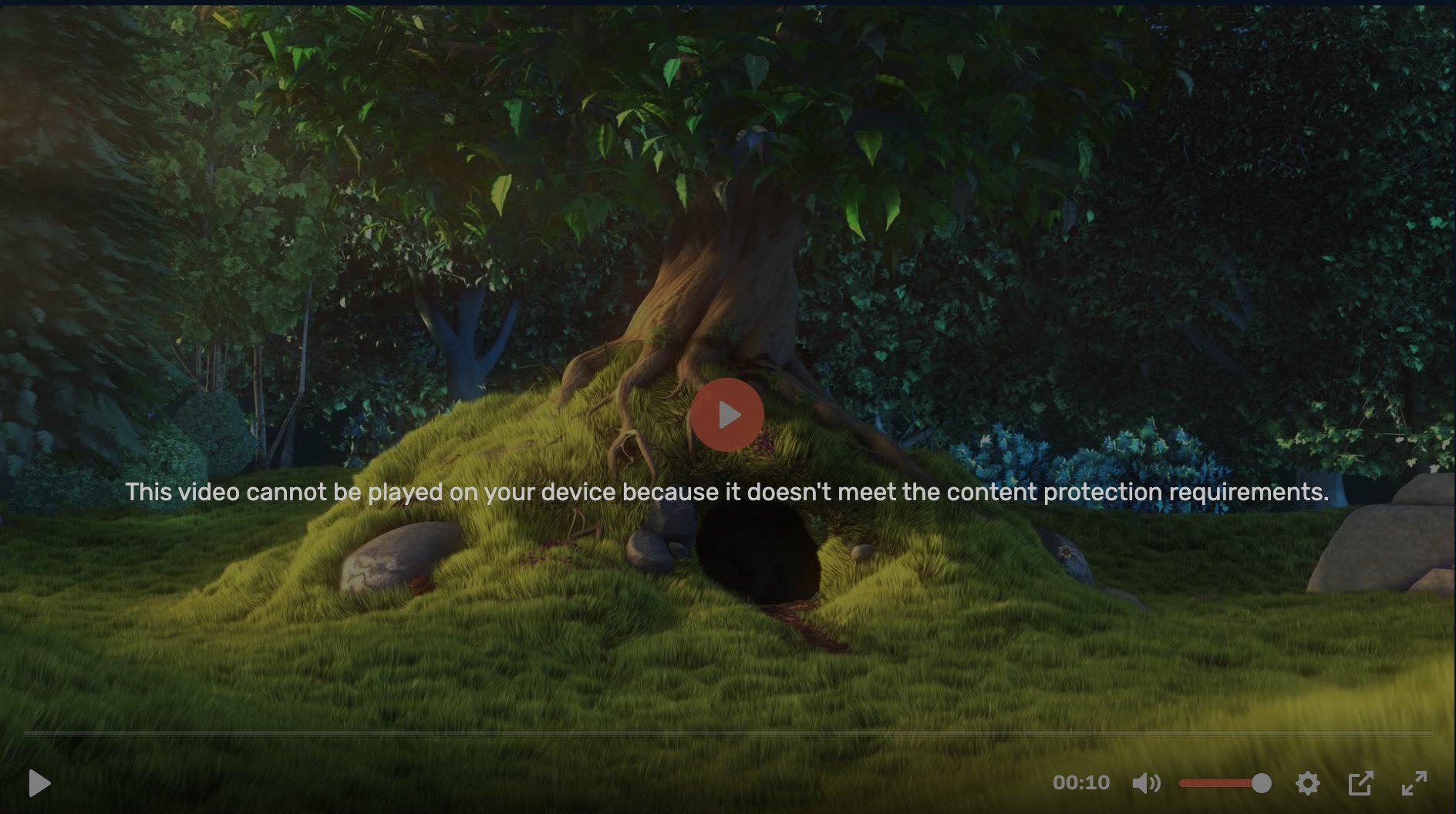
If a device does not meet the minimum required security level for a given type of content, the content will be blocked. In such cases, the following error message will be displayed:
L1 represents the highest level of security provided by Widevine. It mandates that devices meet specific L1 security criteria to stream High Definition (HD) content.All operations involving video rendering, hardware-level decryption, and content decoding are executed within the Trusted Execution Environment. This level is crucial for Over-The-Top (OTT) platforms, such as Netflix and Amazon Prime Video, which restrict HD content playback to devices certified with L1 security. The primary advantage of L1 is its ability to entirely prevent screen captures by mobile applications.Devices and platforms that typically support L1 include:
The L2 security level involves content decoding and rendering through a secure hardware component or a protected co-processor.While media decryption occurs within the TEE, security keys and decrypted media remain inaccessible to the host CPU. It is worth noting that L2 is not designed for mobile device applications.
L3 is a software-only security solution, providing the lowest tier of Widevine’s DRM security.Decryption processes are handled in a software Content Decryption Module (CDM), without the benefit of TEE. Due to its minimal security provisions, devices operating at L3 are often restricted from accessing HD video content by content providers.
A notable exception in Widevine DRM support is found with desktop browsers like Chrome and Firefox on Windows or macOS, which only support the L3 security level, employing software-based DRM mechanisms.
Most environments, including various smart TVs, Android devices, and Fire TV, are capable of supporting the L1 level, ensuring broad compatibility for HD content streaming. However, specific desktop browsers such as Chrome and Firefox are limited to the L3 level, reflecting the varied landscape of device capabilities and DRM requirements.
Bunny Stream MediaCage Enterprise DRM uniquely supports all three Widevine security levels (L1-L3) by default. Additionally, it offers customizable settings that allow content distributors to restrict the distribution of HD content to L3 clients, thereby safeguarding against potential content leakage. These settings can be adjusted via the Stream API or through direct contact with Support services.
{"docsConfig":{"theme":"mint","$schema":"https://mintlify.com/docs.json","name":"bunny.net Documentation","colors":{"primary":"#EF6126","light":"#EF6126","dark":"#EF6126"},"logo":{"light":"https://mintcdn.com/bunnynet-cb9733c2/54-4KCQKoNVNuoyW/logo/bunny-logo-dark.svg?fit=max\u0026auto=format\u0026n=54-4KCQKoNVNuoyW\u0026q=85\u0026s=62c091ea1aaea93d0a981902b7783e37","dark":"https://mintcdn.com/bunnynet-cb9733c2/54-4KCQKoNVNuoyW/logo/bunny-logo-light.svg?fit=max\u0026auto=format\u0026n=54-4KCQKoNVNuoyW\u0026q=85\u0026s=3610e32d68a9fa458b0116ac58ca812a"},"favicon":"https://mintcdn.com/bunnynet-cb9733c2/1bTPx1eyQm8EK8W3/favicon.png?fit=max\u0026auto=format\u0026n=1bTPx1eyQm8EK8W3\u0026q=85\u0026s=85267b63e804fac7a4dd94599bb8c6e8","navbar":{"links":[{"href":"https://bunny.net/docs/api-reference","label":"API Reference"},{"href":"https://github.com/BunnyWay","label":"GitHub"}],"primary":{"type":"button","label":"Get Started","href":"https://dash.bunny.net/auth/register"}},"footer":{"socials":{"discord":"https://discord.gg/bunnynet","github":"https://github.com/BunnyWay","x":"https://x.com/BunnyCDN","bluesky":"https://bsky.app/profile/bunny.net","linkedin":"https://www.linkedin.com/company/bunnynet","facebook":"https://www.facebook.com/bunnycdn"}},"icons":{"library":"lucide"},"contextual":{"options":["copy","claude","chatgpt","cursor","view","vscode"],"display":"header"},"interaction":{"drilldown":false},"metadata":{"timestamp":true},"styling":{"latex":false},"navigation":{"pages":[]}},"deployment":{"deploymentMetadataValue":{"subdomain":"bunnynet-cb9733c2","hasAudioNarration":false,"actualSubdomain":"bunnynet-cb9733c2","customDomains":["bunny.net"],"gitSource":{"type":"github","owner":"bunnyway","repo":"documentation","deployBranch":"main","contentDirectory":"","isPrivate":false,"mountPath":"","label":""},"chroma":{"liveDeploymentHistoryId":"6ae49f2d21d44d6b52dcfe35","collectionId":"5e262b87-ade9-45d8-9b63-06888c8d59a3","schemaVersion":"v3","latestBuiltDeploymentHistoryId":"6ae49f2d21d44d6b52dcfe35"},"feedback":{"thumbs":true,"contextualFeedback":{"allowEmail":true},"agentFeedback":true,"edits":true,"issues":false},"entitlements":{"AI_CHAT":{"status":"ENABLED"},"WEB_MCP":{"status":"ENABLED"},"NARRATION":{"status":"ENABLED"}},"buildId":"6ae586f29229f31e96cc51a9","clientVersion":"0.0.4043","searchFilterCounts":[{"language":"default","tag":"Documentation","count":752},{"language":"default","tag":"API Reference","count":318},{"language":"default","tag":"Core Platform API","count":109},{"language":"default","tag":"CDN","count":82},{"language":"default","tag":"Shield API","count":66},{"language":"default","tag":"Stream","count":66},{"language":"default","tag":"Magic Containers API","count":56},{"language":"default","tag":"Storage","count":54},{"language":"default","tag":"Guides","count":54},{"language":"default","tag":"Reference","count":52}],"searchSettings":{"isFiltersEnabled":true}},"assistantConfig":{"enableStarterQuestions":false,"deflection":{"enabled":true,"type":"link","email":"support@bunny.net","url":"https://bunny.net/contact","showHelpButton":true}},"basePath":"/docs","hasChatPermissions":true,"hasWebMcpPermissions":true,"toggles":[{"name":"kill-isr","enabled":true,"variant":{"name":"disabled","enabled":false,"feature_enabled":true},"impressionData":false},{"name":"agent-mintlify-slack","enabled":true,"variant":{"name":"disabled","enabled":false,"feature_enabled":true},"impressionData":false},{"name":"agent-integrations-settings","enabled":true,"variant":{"name":"disabled","enabled":false,"feature_enabled":true},"impressionData":false},{"name":"automations-pr-grouping","enabled":true,"variant":{"name":"disabled","enabled":false,"feature_enabled":true},"impressionData":false},{"name":"custom-prefix","enabled":true,"variant":{"name":"disabled","enabled":false,"feature_enabled":true},"impressionData":false},{"name":"analytics-v7","enabled":true,"variant":{"name":"disabled","enabled":false,"feature_enabled":true},"impressionData":false},{"name":"user-flows-analytics","enabled":true,"variant":{"name":"disabled","enabled":false,"feature_enabled":true},"impressionData":false},{"name":"no-publish-flow","enabled":true,"variant":{"name":"disabled","enabled":false,"feature_enabled":true},"impressionData":false},{"name":"workos-onboarding","enabled":true,"variant":{"name":"disabled","enabled":false,"feature_enabled":true},"impressionData":false},{"name":"llms-txt-v2","enabled":true,"variant":{"name":"disabled","enabled":false,"feature_enabled":true},"impressionData":false},{"name":"snapshot-serving-live","enabled":true,"variant":{"name":"disabled","enabled":false,"feature_enabled":true},"impressionData":false},{"name":"stripTemperatureMiddleware","enabled":true,"variant":{"name":"disabled","enabled":false,"feature_enabled":true},"impressionData":false},{"name":"support-platform-pylon-zendesk","enabled":true,"variant":{"name":"disabled","enabled":false,"feature_enabled":true},"impressionData":false},{"name":"snapshot-serving","enabled":true,"variant":{"name":"disabled","enabled":false,"feature_enabled":true},"impressionData":false},{"name":"instant-rollback","enabled":true,"variant":{"name":"disabled","enabled":false,"feature_enabled":true},"impressionData":false},{"name":"granular-notifications-server","enabled":true,"variant":{"name":"disabled","enabled":false,"feature_enabled":true},"impressionData":false},{"name":"granular-notifications","enabled":true,"variant":{"name":"disabled","enabled":false,"feature_enabled":true},"impressionData":false},{"name":"automations-fable","enabled":true,"variant":{"name":"disabled","enabled":false,"feature_enabled":true},"impressionData":false},{"name":"fixed-ai-action-pricing","enabled":true,"variant":{"name":"disabled","enabled":false,"feature_enabled":true},"impressionData":false},{"name":"automation-resolve-merge-conflict","enabled":true,"variant":{"name":"disabled","enabled":false,"feature_enabled":true},"impressionData":false},{"name":"scoped-publishing","enabled":true,"variant":{"name":"disabled","enabled":false,"feature_enabled":true},"impressionData":false},{"name":"mintql","enabled":true,"variant":{"name":"disabled","enabled":false,"feature_enabled":true},"impressionData":false},{"name":"page-level-analytics","enabled":true,"variant":{"name":"disabled","enabled":false,"feature_enabled":true},"impressionData":false},{"name":"editor-version-history-v2","enabled":true,"variant":{"name":"disabled","enabled":false,"feature_enabled":true},"impressionData":false},{"name":"billing-page-v2","enabled":true,"variant":{"name":"disabled","enabled":false,"feature_enabled":true},"impressionData":false},{"name":"full-page-search","enabled":true,"variant":{"name":"disabled","enabled":false,"feature_enabled":true},"impressionData":false},{"name":"workspace-projects","enabled":true,"variant":{"name":"disabled","enabled":false,"feature_enabled":true},"impressionData":false},{"name":"assistant-v5","enabled":true,"variant":{"name":"disabled","enabled":false,"feature_enabled":true},"impressionData":false},{"name":"byok-sep-25","enabled":true,"variant":{"name":"disabled","enabled":false,"feature_enabled":true},"impressionData":false},{"name":"fork-pr-previews","enabled":true,"variant":{"name":"disabled","enabled":false,"feature_enabled":true},"impressionData":false},{"name":"revalidation-jwt","enabled":true,"variant":{"name":"disabled","enabled":false,"feature_enabled":true},"impressionData":false},{"name":"vite-origin","enabled":true,"variant":{"name":"disabled","enabled":false,"feature_enabled":true},"impressionData":false},{"name":"billing-updated-9-15","enabled":true,"variant":{"name":"disabled","enabled":false,"feature_enabled":true},"impressionData":false},{"name":"workos-sso-scim","enabled":true,"variant":{"name":"disabled","enabled":false,"feature_enabled":true},"impressionData":false},{"name":"hobby-abuse-scan","enabled":true,"variant":{"name":"disabled","enabled":false,"feature_enabled":true},"impressionData":false},{"name":"dashboard-inbox","enabled":true,"variant":{"name":"disabled","enabled":false,"feature_enabled":true},"impressionData":false},{"name":"workos-signup","enabled":true,"variant":{"name":"disabled","enabled":false,"feature_enabled":true},"impressionData":false},{"name":"turbopuffer-dual-write","enabled":true,"variant":{"name":"disabled","enabled":false,"feature_enabled":true},"impressionData":false},{"name":"workos-enabled","enabled":true,"variant":{"name":"disabled","enabled":false,"feature_enabled":true},"impressionData":false},{"name":"approve-review-flow","enabled":true,"variant":{"name":"disabled","enabled":false,"feature_enabled":true},"impressionData":false},{"name":"sso-setup-deadline-banner","enabled":true,"variant":{"name":"disabled","enabled":false,"feature_enabled":true},"impressionData":false}],"privacy":{"consentBanner":{"enabled":true}},"googleFontsInlined":false},"customCss":[{"filePath":"style.css","content":".dark img[src*=\"/logo/frameworks/angular.svg\"],.dark img[src*=\"/logo/frameworks/eleventy.svg\"],.dark img[src*=\"/logo/frameworks/express.svg\"],.dark img[src*=\"/logo/frameworks/mariadb.svg\"],.dark img[src*=\"/logo/frameworks/nextjs.svg\"],.dark img[src*=\"/logo/frameworks/sphinx.svg\"]{filter:invert(1)}html:not(.dark) img[src*=\"/logo/frameworks/zola.svg\"]{filter:invert(1)}"}],"page":{"pagePath":"stream/widevine-security-levels","slug":"/stream/widevine-security-levels","pageMetadata":{"title":"Google Widevine DRM","description":"Understand Widevine DRM security levels (L1, L2, L3) and device compatibility for HD content.","href":"/stream/widevine-security-levels"},"description":{"compiledSource":"\"use strict\";\nconst {jsx: _jsx} = arguments[0];\nconst {useMDXComponents: _provideComponents} = arguments[0];\nfunction _createMdxContent(props) {\n const _components = {\n p: \"p\",\n ..._provideComponents(),\n ...props.components\n };\n return _jsx(_components.p, {\n children: \"Understand Widevine DRM security levels (L1, L2, L3) and device compatibility for HD content.\"\n });\n}\nfunction MDXContent(props = {}) {\n const {wrapper: MDXLayout} = {\n ..._provideComponents(),\n ...props.components\n };\n return MDXLayout ? _jsx(MDXLayout, {\n ...props,\n children: _jsx(_createMdxContent, {\n ...props\n })\n }) : _createMdxContent(props);\n}\nreturn {\n default: MDXContent\n};\n","frontmatter":{},"scope":{}},"pageType":"default","mdx":{"mdxSource":{"compiledSource":"\"use strict\";const{Fragment:_Fragment,jsx:_jsx,jsxs:_jsxs}=arguments[0];const{useMDXComponents:_provideComponents}=arguments[0];function _createMdxContent(props){const _components={li:`li`,p:`p`,ul:`ul`,..._provideComponents(),...props.components},{Heading,Info,OptimizedImage}=_components;if(!Heading)_missingMdxReference(`Heading`,true);if(!Info)_missingMdxReference(`Info`,true);if(!OptimizedImage)_missingMdxReference(`OptimizedImage`,true);return _jsxs(_Fragment,{children:[_jsx(_components.p,{children:`Widevine DRM enforces different content-quality tiers based on the security capabilities of the playback device. Understanding the L1, L2, and L3 levels — and their reliance on a Trusted Execution Environment — helps you set realistic expectations for which devices can stream HD or higher content.`}),`\n`,_jsx(Heading,{level:`2`,id:`trusted-execution-environment-tee`,children:`Trusted Execution Environment (TEE)`}),`\n`,_jsx(_components.p,{children:`The Trusted Execution Environment (TEE) is an essential component within a primary processor, designed to safeguard code and data against unauthorized access and ensure their confidentiality and integrity. In the realm of Digital Rights Management (DRM), TEE plays a pivotal role in enhancing security measures, particularly in the protection of decryption keys and the prevention of video content leaks.`}),`\n`,_jsx(Heading,{level:`2`,id:`widevine-drm-security-levels-explained`,children:`Widevine DRM security levels explained`}),`\n`,_jsx(_components.p,{children:`Google’s Widevine DRM technology offers three distinct security levels — L1, L2, and L3 — each designed to cater to different requirements of content protection. These levels are critical in determining the quality of content that can be securely streamed and accessed on various devices.`}),`\n`,_jsxs(Info,{children:[_jsx(_components.p,{children:`If a device does not meet the minimum required security level for a given type of content, the content will be blocked. In such cases, the following error message will be displayed:`}),_jsx(OptimizedImage,{src:`https://mintcdn.com/bunnynet-cb9733c2/L57MhyfuZyBVCcmn/images/docs/5bfeb57-image.png?fit=max\u0026auto=format\u0026n=L57MhyfuZyBVCcmn\u0026q=85\u0026s=2471caa6d7d81310987007756ace20d5`,alt:``,\"data-og-width\":`1888`,width:`1888`,\"data-og-height\":`1056`,height:`1056`,\"data-path\":`images/docs/5bfeb57-image.png`,\"data-optimize\":`true`,\"data-opv\":`3`,srcset:`https://mintcdn.com/bunnynet-cb9733c2/L57MhyfuZyBVCcmn/images/docs/5bfeb57-image.png?w=280\u0026fit=max\u0026auto=format\u0026n=L57MhyfuZyBVCcmn\u0026q=85\u0026s=845063332c5b9142e7d03664f4c305df 280w, https://mintcdn.com/bunnynet-cb9733c2/L57MhyfuZyBVCcmn/images/docs/5bfeb57-image.png?w=560\u0026fit=max\u0026auto=format\u0026n=L57MhyfuZyBVCcmn\u0026q=85\u0026s=ae800cbbf66044ded1d3888f17baa3aa 560w, https://mintcdn.com/bunnynet-cb9733c2/L57MhyfuZyBVCcmn/images/docs/5bfeb57-image.png?w=840\u0026fit=max\u0026auto=format\u0026n=L57MhyfuZyBVCcmn\u0026q=85\u0026s=5df42cb1b5e9cdbd1562e16bda3303a5 840w, https://mintcdn.com/bunnynet-cb9733c2/L57MhyfuZyBVCcmn/images/docs/5bfeb57-image.png?w=1100\u0026fit=max\u0026auto=format\u0026n=L57MhyfuZyBVCcmn\u0026q=85\u0026s=a48a9d9ae6ecd0093aa70d10636c4d7c 1100w, https://mintcdn.com/bunnynet-cb9733c2/L57MhyfuZyBVCcmn/images/docs/5bfeb57-image.png?w=1650\u0026fit=max\u0026auto=format\u0026n=L57MhyfuZyBVCcmn\u0026q=85\u0026s=34240342a659faca959af05c270c3d0a 1650w, https://mintcdn.com/bunnynet-cb9733c2/L57MhyfuZyBVCcmn/images/docs/5bfeb57-image.png?w=2500\u0026fit=max\u0026auto=format\u0026n=L57MhyfuZyBVCcmn\u0026q=85\u0026s=be6ba67b966e7b80c85966456896a478 2500w`})]}),`\n`,_jsx(Heading,{level:`3`,id:`l1-security-level`,children:`L1 security level`}),`\n`,_jsx(_components.p,{children:`L1 represents the highest level of security provided by Widevine. It mandates that devices meet specific L1 security criteria to stream High Definition (HD) content.`}),`\n`,_jsx(_components.p,{children:`All operations involving video rendering, hardware-level decryption, and content decoding are executed within the Trusted Execution Environment. This level is crucial for Over-The-Top (OTT) platforms, such as Netflix and Amazon Prime Video, which restrict HD content playback to devices certified with L1 security. The primary advantage of L1 is its ability to entirely prevent screen captures by mobile applications.`}),`\n`,_jsx(_components.p,{children:`Devices and platforms that typically support L1 include:`}),`\n`,_jsxs(_components.ul,{children:[`\n`,_jsx(_components.li,{children:`Android apps`}),`\n`,_jsx(_components.li,{children:`Samsung and LG Smart TVs`}),`\n`,_jsx(_components.li,{children:`Android TV`}),`\n`,_jsx(_components.li,{children:`Fire TV`}),`\n`]}),`\n`,_jsx(Heading,{level:`3`,id:`l2-security-level`,children:`L2 security level`}),`\n`,_jsx(_components.p,{children:`The L2 security level involves content decoding and rendering through a secure hardware component or a protected co-processor.`}),`\n`,_jsx(_components.p,{children:`While media decryption occurs within the TEE, security keys and decrypted media remain inaccessible to the host CPU. It is worth noting that L2 is not designed for mobile device applications.`}),`\n`,_jsx(Heading,{level:`3`,id:`l3-security-level`,children:`L3 security level`}),`\n`,_jsx(_components.p,{children:`L3 is a software-only security solution, providing the lowest tier of Widevine’s DRM security.`}),`\n`,_jsx(_components.p,{children:`Decryption processes are handled in a software Content Decryption Module (CDM), without the benefit of TEE. Due to its minimal security provisions, devices operating at L3 are often restricted from accessing HD video content by content providers.`}),`\n`,_jsxs(Info,{children:[_jsx(Heading,{level:`3`,id:`important`,children:`Important`}),_jsx(_components.p,{children:`A notable exception in Widevine DRM support is found with desktop browsers like Chrome and Firefox on Windows or macOS, which only support the L3 security level, employing software-based DRM mechanisms.`})]}),`\n`,_jsx(Heading,{level:`2`,id:`supporting-widevine-levels-across-devices`,children:`Supporting Widevine levels across devices`}),`\n`,_jsx(_components.p,{children:`Most environments, including various smart TVs, Android devices, and Fire TV, are capable of supporting the L1 level, ensuring broad compatibility for HD content streaming. However, specific desktop browsers such as Chrome and Firefox are limited to the L3 level, reflecting the varied landscape of device capabilities and DRM requirements.`}),`\n`,_jsx(Heading,{level:`2`,id:`custom-settings-for-content-distribution`,children:`Custom settings for content distribution`}),`\n`,_jsxs(_components.p,{children:[`Bunny Stream MediaCage Enterprise DRM uniquely supports all three Widevine security levels (L1-L3) by default. Additionally, it offers customizable settings that allow content distributors to restrict the distribution of HD content to L3 clients, thereby safeguarding against potential content leakage. These settings can be adjusted via the Stream API or through direct contact with Support services.`,_jsx(`br`,{}),_jsx(`br`,{})]})]})}function MDXContent(props={}){const{wrapper:MDXLayout}={..._provideComponents(),...props.components};return MDXLayout?_jsx(MDXLayout,{...props,children:_jsx(_createMdxContent,{...props})}):_createMdxContent(props)}return{default:MDXContent};function _missingMdxReference(id,component){throw new Error(`Expected `+(component?`component`:`object`)+\" `\"+id+\"` to be defined: you likely forgot to import, pass, or provide it.\")}","frontmatter":{},"scope":{"config":{},"pageMetadata":{"title":"Google Widevine DRM","description":"Understand Widevine DRM security levels (L1, L2, L3) and device compatibility for HD content.","href":"/stream/widevine-security-levels"}}},"mdxSourceWithNoJs":null},"mdxExtracts":{"tableOfContents":[{"title":"Trusted Execution Environment (TEE)","slug":"trusted-execution-environment-tee","depth":2,"children":[]},{"title":"Widevine DRM security levels explained","slug":"widevine-drm-security-levels-explained","depth":2,"children":[{"title":"L1 security level","slug":"l1-security-level","depth":3,"children":[]},{"title":"L2 security level","slug":"l2-security-level","depth":3,"children":[]},{"title":"L3 security level","slug":"l3-security-level","depth":3,"children":[]},{"title":"Important","slug":"important","depth":3,"children":[]}]},{"title":"Supporting Widevine levels across devices","slug":"supporting-widevine-levels-across-devices","depth":2,"children":[]},{"title":"Custom settings for content distribution","slug":"custom-settings-for-content-distribution","depth":2,"children":[]}],"codeExamples":{}},"jsLinks":[],"subdomain":"bunnynet-cb9733c2","siteName":"bunny.net Documentation","title":"Google Widevine DRM - bunny.net Documentation","relatedPagesConfig":{"enabled":false,"limit":5,"mode":"automatic"},"navMaps":{"firstHrefInVersion":{},"firstHrefInLanguage":{}},"lastModified":"2026-07-30T15:28:17.281Z","gitLastModified":"2026-07-23T12:37:04.000Z","originalFileLocation":"stream/widevine-security-levels.mdx"},"headHtml":"\u003cscript data-mint-head>(function(){var d=document.documentElement,p=null;if(!p){try{p=localStorage.getItem(\"isDarkMode\")}catch(e){}if(p==='true')p='dark';else if(p==='false')p='light';if(p!=='light'\u0026\u0026p!=='dark'\u0026\u0026p!=='system')p=\"system\"}var r=p==='system'?(matchMedia(\"(prefers-color-scheme: dark)\").matches?'dark':'light'):p;d.classList.remove(r==='dark'?'light':'dark');d.classList.add(r);d.setAttribute(\"data-theme-preference\",p)})();\u003c/script>\u003cmeta data-mint-head name=\"description\" content=\"Understand Widevine DRM security levels (L1, L2, L3) and device compatibility for HD content.\">\u003cmeta data-mint-head name=\"application-name\" content=\"bunny.net Documentation\">\u003cmeta data-mint-head name=\"generator\" content=\"Mintlify\">\u003clink data-mint-head rel=\"icon\" type=\"image/png\" sizes=\"192x192\" href=\"/docs/mintlify-assets/_mintlify/favicons/bunnynet-cb9733c2/Zv4NOenQlgPS3TXm/_generated/favicon/android-chrome-192x192.png\" media=\"(prefers-color-scheme: light)\">\u003clink data-mint-head rel=\"apple-touch-icon\" type=\"image/png\" sizes=\"180x180\" href=\"/docs/mintlify-assets/_mintlify/favicons/bunnynet-cb9733c2/Zv4NOenQlgPS3TXm/_generated/favicon/apple-touch-icon.png\">\u003clink data-mint-head rel=\"icon\" type=\"image/png\" sizes=\"16x16\" href=\"/docs/mintlify-assets/_mintlify/favicons/bunnynet-cb9733c2/Zv4NOenQlgPS3TXm/_generated/favicon/favicon-16x16.png\" media=\"(prefers-color-scheme: light)\">\u003clink data-mint-head rel=\"icon\" type=\"image/png\" sizes=\"32x32\" href=\"/docs/mintlify-assets/_mintlify/favicons/bunnynet-cb9733c2/Zv4NOenQlgPS3TXm/_generated/favicon/favicon-32x32.png\" media=\"(prefers-color-scheme: light)\">\u003clink data-mint-head rel=\"shortcut icon\" type=\"image/x-icon\" href=\"/docs/mintlify-assets/_mintlify/favicons/bunnynet-cb9733c2/Zv4NOenQlgPS3TXm/_generated/favicon/favicon.ico\" media=\"(prefers-color-scheme: light)\">\u003clink data-mint-head rel=\"icon\" type=\"image/png\" sizes=\"192x192\" href=\"/docs/mintlify-assets/_mintlify/favicons/bunnynet-cb9733c2/Zv4NOenQlgPS3TXm/_generated/favicon-dark/android-chrome-192x192.png\" media=\"(prefers-color-scheme: dark)\">\u003clink data-mint-head rel=\"icon\" type=\"image/png\" sizes=\"16x16\" href=\"/docs/mintlify-assets/_mintlify/favicons/bunnynet-cb9733c2/Zv4NOenQlgPS3TXm/_generated/favicon-dark/favicon-16x16.png\" media=\"(prefers-color-scheme: dark)\">\u003clink data-mint-head rel=\"icon\" type=\"image/png\" sizes=\"32x32\" href=\"/docs/mintlify-assets/_mintlify/favicons/bunnynet-cb9733c2/Zv4NOenQlgPS3TXm/_generated/favicon-dark/favicon-32x32.png\" media=\"(prefers-color-scheme: dark)\">\u003clink data-mint-head rel=\"shortcut icon\" type=\"image/x-icon\" href=\"/docs/mintlify-assets/_mintlify/favicons/bunnynet-cb9733c2/Zv4NOenQlgPS3TXm/_generated/favicon-dark/favicon.ico\" media=\"(prefers-color-scheme: dark)\">\u003cmeta data-mint-head property=\"og:title\" content=\"Google Widevine DRM - bunny.net Documentation\">\u003cmeta data-mint-head property=\"og:description\" content=\"Understand Widevine DRM security levels (L1, L2, L3) and device compatibility for HD content.\">\u003cmeta data-mint-head property=\"og:site_name\" content=\"bunny.net Documentation\">\u003cmeta data-mint-head property=\"og:url\" content=\"https://bunny.net/docs/stream/widevine-security-levels\">\u003cmeta data-mint-head property=\"og:type\" content=\"website\">\u003cmeta data-mint-head property=\"og:image\" content=\"https://bunnynet-cb9733c2.mintlify.app/_mintlify/api/og/v2?division=Enterprise+DRM\u0026amp;title=Google+Widevine+DRM\u0026amp;description=Understand+Widevine+DRM+security+levels+%28L1%2C+L2%2C+L3%29+and+device+compatibility+for+HD+content.\u0026amp;theme=3e3fa11ba94222b95e7f52d5\u0026amp;signature=73ba7ce89a367c1ee00a49070efa496324a17893e37f61aae3629df2c6b6ecd1\">\u003cmeta data-mint-head property=\"og:image:width\" content=\"1200\">\u003cmeta data-mint-head property=\"og:image:height\" content=\"630\">\u003cmeta data-mint-head name=\"twitter:card\" content=\"summary_large_image\">\u003cmeta data-mint-head name=\"twitter:title\" content=\"Google Widevine DRM - bunny.net Documentation\">\u003cmeta data-mint-head name=\"twitter:description\" content=\"Understand Widevine DRM security levels (L1, L2, L3) and device compatibility for HD content.\">\u003cmeta data-mint-head name=\"twitter:image\" content=\"https://bunnynet-cb9733c2.mintlify.app/_mintlify/api/og/v2?division=Enterprise+DRM\u0026amp;title=Google+Widevine+DRM\u0026amp;description=Understand+Widevine+DRM+security+levels+%28L1%2C+L2%2C+L3%29+and+device+compatibility+for+HD+content.\u0026amp;theme=3e3fa11ba94222b95e7f52d5\u0026amp;signature=73ba7ce89a367c1ee00a49070efa496324a17893e37f61aae3629df2c6b6ecd1\">\u003cmeta data-mint-head name=\"twitter:image:width\" content=\"1200\">\u003cmeta data-mint-head name=\"twitter:image:height\" content=\"630\">\u003cmeta data-mint-head name=\"msapplication-config\" content=\"/docs/mintlify-assets/_mintlify/favicons/bunnynet-cb9733c2/Zv4NOenQlgPS3TXm/_generated/favicon/browserconfig.xml\">\u003cmeta data-mint-head name=\"apple-mobile-web-app-title\" content=\"bunny.net Documentation\">\u003cmeta data-mint-head name=\"msapplication-TileColor\" content=\"#EF6126\">\u003clink data-mint-head rel=\"canonical\" href=\"https://bunny.net/docs/stream/widevine-security-levels\">\u003clink data-mint-head rel=\"alternate\" type=\"application/xml\" href=\"/docs/sitemap.xml\">\u003clink data-mint-head rel=\"alternate\" type=\"text/markdown\" href=\"/docs/stream/widevine-security-levels.md\">\u003cscript data-mint-head type=\"application/ld+json\">{\"@context\":\"https://schema.org\",\"@graph\":[{\"@type\":\"Organization\",\"@id\":\"https://bunny.net/#organization\",\"name\":\"bunny.net Documentation\",\"url\":\"https://bunny.net\",\"logo\":{\"@type\":\"ImageObject\",\"url\":\"https://mintcdn.com/bunnynet-cb9733c2/54-4KCQKoNVNuoyW/logo/bunny-logo-dark.svg?fit=max\u0026auto=format\u0026n=54-4KCQKoNVNuoyW\u0026q=85\u0026s=62c091ea1aaea93d0a981902b7783e37\"}},{\"@type\":\"WebSite\",\"@id\":\"https://bunny.net/docs#website\",\"name\":\"bunny.net Documentation\",\"url\":\"https://bunny.net/docs\",\"publisher\":{\"@id\":\"https://bunny.net/#organization\"}},{\"@type\":\"WebPage\",\"@id\":\"https://bunny.net/docs/stream/widevine-security-levels#webpage\",\"url\":\"https://bunny.net/docs/stream/widevine-security-levels\",\"name\":\"Google Widevine DRM\",\"description\":\"Understand Widevine DRM security levels (L1, L2, L3) and device compatibility for HD content.\",\"dateModified\":\"2026-07-23T12:37:04.000Z\",\"isPartOf\":{\"@id\":\"https://bunny.net/docs#website\"},\"breadcrumb\":{\"@id\":\"https://bunny.net/docs/stream/widevine-security-levels#breadcrumb\"}},{\"@type\":\"BreadcrumbList\",\"@id\":\"https://bunny.net/docs/stream/widevine-security-levels#breadcrumb\",\"itemListElement\":[{\"@type\":\"ListItem\",\"position\":1,\"name\":\"Features\",\"item\":\"https://bunny.net/docs/stream/encoding\"},{\"@type\":\"ListItem\",\"position\":2,\"name\":\"MediaCage DRM\",\"item\":\"https://bunny.net/docs/stream/drm/index\"},{\"@type\":\"ListItem\",\"position\":3,\"name\":\"Enterprise DRM\",\"item\":\"https://bunny.net/docs/stream/mediacage-enterprise\"},{\"@type\":\"ListItem\",\"position\":4,\"name\":\"Google Widevine DRM\",\"item\":\"https://bunny.net/docs/stream/widevine-security-levels\"}]},{\"@type\":[\"Article\",\"TechArticle\"],\"@id\":\"https://bunny.net/docs/stream/widevine-security-levels#article\",\"headline\":\"Google Widevine DRM\",\"name\":\"Google Widevine DRM\",\"description\":\"Understand Widevine DRM security levels (L1, L2, L3) and device compatibility for HD content.\",\"url\":\"https://bunny.net/docs/stream/widevine-security-levels\",\"mainEntityOfPage\":{\"@id\":\"https://bunny.net/docs/stream/widevine-security-levels#webpage\"},\"dateModified\":\"2026-07-23T12:37:04.000Z\",\"publisher\":{\"@id\":\"https://bunny.net/#organization\"},\"isPartOf\":{\"@id\":\"https://bunny.net/docs#website\"}}]}\u003c/script>\u003cscript data-mint-head type=\"application/ld+json\">{\"@context\":\"https://schema.org\",\"@type\":\"WebSite\",\"name\":\"bunny.net Documentation\",\"creator\":{\"@type\":\"Organization\",\"name\":\"Mintlify\",\"url\":\"https://mintlify.com\"}}\u003c/script>","siteName":"bunny.net Documentation","nav":{"global":null,"products":[{"product":"Home","icon":"book-open","pages":[{"title":"Home","href":""}]},{"product":"CDN","icon":"zap","description":"Accelerate and protect your content globally","pages":[{"title":"CDN","href":"/cdn"}]},{"product":"Magic Containers","icon":"box","description":"Deploy any app anywhere with Docker","pages":[{"title":"Magic Containers","href":"/magic-containers"}]},{"product":"Edge Scripting","icon":"code","description":"Deploy serverless code at the edge","pages":[{"title":"Edge Scripting","href":"/scripting"}]},{"product":"Stream","icon":"video","description":"Video streaming and delivery platform","tabs":[{"tab":"Documentation","groups":[{"group":"Documentation","pages":[{"title":"Bunny Stream","sidebarTitle":"Introduction","mode":"wide","href":"/stream"},{"title":"Quickstart","href":"/stream/quickstart"},{"title":"Authentication","href":"/stream/authentication"},{"title":"Pricing","href":"/stream/pricing"},{"title":"Bunny Stream Changelog","sidebarTitle":"Changelog","url":"/changelog?tags=Stream","href":"/stream/changelog"}]},{"group":"Features","pages":[{"group":"Encoding","pages":[{"title":"Free Encoding","sidebarTitle":"Free Encoding","href":"/stream/encoding"},{"title":"Adaptive bitrate streaming","href":"/stream/adaptive-bitrate"},{"title":"Multi-audio","href":"/stream/multi-audio"}]},{"title":"Premium Encoding","href":"/stream/premium-encoding"},{"title":"Transcribing","href":"/stream/transcribing"},{"title":"Smart Generate","href":"/stream/smart-generate"},{"group":"MediaCage DRM","pages":[{"title":"MediaCage DRM","sidebarTitle":"Overview","href":"/stream/drm/index"},{"title":"Quickstart MediaCage Basic DRM","href":"/stream/quickstart-mediacage-basic"},{"title":"Quickstart MediaCage Enterprise DRM","href":"/stream/quickstart-mediacage-enterprise"},{"group":"Basic DRM","pages":[{"title":"MediaCage Basic DRM","href":"/stream/mediacage-basic"},{"title":"Understanding MediaCage basic DRM","href":"/stream/mediacage-basic-guide"}]},{"group":"Enterprise DRM","pages":[{"title":"MediaCage Enterprise DRM","description":"MediaCage Enterprise DRM provides advanced digital content protection for enterprise-level requirements. It integrates cutting-edge technologies such as FairPlay and Widevine to deliver an elevated level of security and enhanced encryption features. Please note that MediaCage Enterprise DRM is a premium feature and requires coordination with our sales team for activation.","href":"/stream/mediacage-enterprise"},{"title":"Google Widevine DRM","href":"/stream/widevine-security-levels"},{"title":"Google Widevine DRM SD only for L3","description":"Custom Settings for Content Distribution","href":"/stream/widevine-l3"},{"title":"Apple FairPlay Streaming","href":"/stream/fairplay-deployment"}]}]},{"title":"Advertising VAST","href":"/stream/vast"},{"title":"Delivery Tiers","href":"/stream/delivery-tiers"},{"title":"Replication","href":"/stream/replication"},{"group":"Security","pages":[{"title":"Security","sidebarTitle":"Overview","href":"/stream/security"},{"title":"Understanding Bunny Stream security options","sidebarTitle":"Security Options","href":"/stream/security-options"},{"title":"Embedded view token authentication","sidebarTitle":"Token Authentication","href":"/stream/token-authentication"}]},{"title":"Statistics","href":"/stream/statistics"},{"title":"Webhooks","href":"/stream/webhooks"}]},{"group":"Manage Videos","pages":[{"group":"Upload","pages":[{"title":"Dashboard","href":"/stream/dashboard"},{"title":"HTTP","href":"/stream/http-api"},{"title":"URL Fetch","href":"/stream/url-fetch"},{"title":"TUS Resumable Uploads","href":"/stream/tus-resumable-uploads"},{"group":"Frameworks","pages":[{"title":"Upload videos to Bunny Stream from Laravel","sidebarTitle":"Laravel","href":"/stream/upload/laravel"},{"title":"Upload videos to Bunny Stream from Rails","sidebarTitle":"Rails","href":"/stream/upload/rails"},{"title":"Upload videos to Bunny Stream from Django","sidebarTitle":"Django","href":"/stream/upload/django"}]}]},{"title":"Collections","href":"/stream/collections"},{"title":"Tagging","href":"/stream/tagging"},{"title":"MetaTags","href":"/stream/metatags"},{"title":"Storage Structure","href":"/stream/storage-structure"}]},{"group":"Playback","pages":[{"title":"Bunny Player","sidebarTitle":"Bunny Player","href":"/stream/player"},{"title":"Overview","sidebarTitle":"Player settings","href":"/stream/player-settings"},{"title":"Embedding videos","href":"/stream/embedding"},{"title":"Playback control API","href":"/stream/playback-api"},{"title":"MP4 Fallback","href":"/stream/mp4-downloads"},{"group":"Frameworks","pages":[{"title":"Use Bunny Player with React","sidebarTitle":"React","href":"/stream/player/react"},{"title":"Use Bunny Player with Next.js","sidebarTitle":"Next.js","href":"/stream/player/nextjs"},{"title":"Use Bunny Player with Vue and Nuxt","sidebarTitle":"Vue and Nuxt","href":"/stream/player/vue"},{"title":"Use Bunny Player with Svelte and SvelteKit","sidebarTitle":"Svelte and SvelteKit","href":"/stream/player/svelte"},{"title":"Use Bunny Player with Astro","sidebarTitle":"Astro","href":"/stream/player/astro"},{"title":"Use Bunny Player with JavaScript","sidebarTitle":"JavaScript","href":"/stream/player/javascript"},{"title":"Sign Bunny Player embed URLs on the server","sidebarTitle":"Signed embed URLs","href":"/stream/player/signed-embeds"}]},{"group":"Mobile SDKs","tag":"New","expanded":true,"pages":[{"title":"Overview","sidebarTitle":"Overview","href":"/stream/mobile-sdk"},{"title":"Token authentication with Mobile SDKs","sidebarTitle":"Mobile SDK Token Authentication","href":"/stream/mobile-sdk-token-authentication"},{"title":"Expo Video guide","href":"/stream/expo-video"},{"title":"Android SDK","tag":"Kotlin","href":"/stream/android-sdk"},{"title":"iOS SDK","tag":"Swift","href":"/stream/ios-sdk"},{"title":"React Native SDK","tag":"Typescript","sidebarTitle":"React Native SDK","href":"/stream/react-native-sdk"}]},{"group":"3rd Party Players","pages":[{"title":"Introduction","href":"/stream/players/index"},{"title":"Bitmovin player integration","href":"/stream/players/bitmovin"},{"title":"Shaka Player integration","href":"/stream/players/shaka"},{"title":"Widevine HTML5 integration","href":"/stream/players/widevine"},{"title":"Fairplay HTML5 player integration","href":"/stream/players/fairplay"}]},{"title":"Custom head HTML migration guide","href":"/stream/custom-head-html-migration-guide"}]},{"group":"Reference","pages":[{"title":"Video Specification","href":"/stream/video-specification"},{"title":"Vimeo2Bunny CLI","href":"/stream/vimeo2bunny"},{"title":"Data and Privacy","href":"/stream/data-and-privacy"},{"title":"API Reference","url":"/api-reference/stream","href":"/stream/api-reference"}]}]}]},{"product":"Storage","icon":"hard-drive","description":"Global object storage","pages":[{"title":"Storage","href":"/storage"}]},{"product":"Shield","icon":"shield","description":"Stay protected and online no matter what","pages":[{"title":"Shield","href":"/shield"}]},{"product":"Optimizer","icon":"sparkles","description":"Automatic image and web optimization.","pages":[{"title":"Optimizer","href":"/optimizer"}]},{"product":"DNS","icon":"globe","description":"Unlock the true power of DNS with an ultra-fast scriptable platform","pages":[{"title":"DNS","href":"/dns"}]},{"product":"Database","icon":"database","description":"Serverless SQLite over HTTP","pages":[{"title":"Database","href":"/database"}]},{"product":"Integrations","icon":"puzzle","description":"Official and third-party plugins and integrations","pages":[{"title":"Integrations","href":"/integrations/wordpress"}]},{"product":"CLI","icon":"terminal","description":"Manage bunny.net from your terminal","pages":[{"title":"CLI","href":"/cli"}]},{"product":"API Reference","icon":"square-terminal","description":"Build \u0026 Integrate with the Platform API","pages":[{"title":"API Reference","href":"/api-reference"}]},{"product":"Partners","icon":"handshake","description":"Manage customers, pricing, and billing as a bunny.net partner","pages":[{"title":"Partners","href":"/partners"}]}]},"basePath":"","title":"Google Widevine DRM - bunny.net Documentation","buildId":"dpl_4RHMRqtvdHvKgaEfTTjFqjzja3B6","deploymentId":"dpl_4RHMRqtvdHvKgaEfTTjFqjzja3B6","dynamics":["a74be98ba7"],"chunks":["zoom-image-lightbox-CZTaVDTN.js","lightbox-handle-r17bVUz3.js"]}